Outgoing Webhooks
Download PDFSend LogZilla trigger events to Slack, PagerDuty, or any HTTP endpoint using GET or POST webhooks with JSON payload templates and event variable substitution
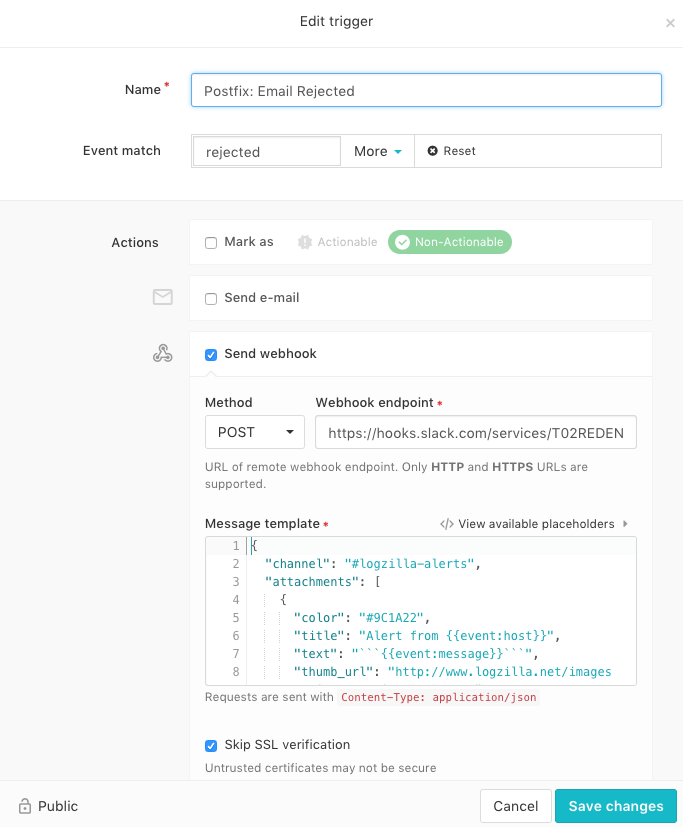
The Webhook option in the trigger menu allows users to send a GET or POST
webhook command to a northbound server such as slack.com
The example below shows a trigger set to match rejected messages from
Postfix. When the trigger matches, it will post to a Slack channel
automatically.
Webhook Post to Slack
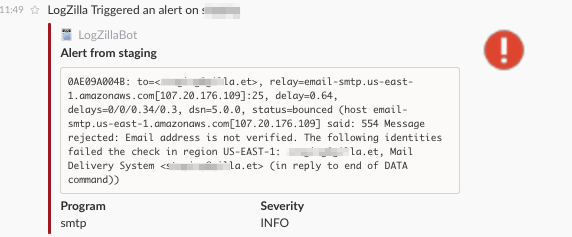
Alert Shown in Slack Channel
Post Data Used
The Trigger above uses the following JSON:
{ "channel": "#logzilla-alerts", "attachments": [ { "color": "#9C1A22", "title": "Alert from {{event:host}}", "text": "```{{event:message}}```", "thumb_url": "http://www.logzilla.net/images/icon_warning_25x25.png", "fallback": "Alert from {{event:host}}", "author_icon": "http://www.logzilla.net/images/log_file_icon_25x25.png", "pretext": "LogZilla Triggered an alert on {{event:host}}", "author_link": "mailto:[email protected]", "fields": [ { "value": "{{event:program}}", "title": "Program", "short": "true" }, { "value": "{{event:severity}}", "short": "true", "title": "Severity" } ], "mrkdwn_in": [ "text", "fields" ], "author_name": "LogZillaBot" } ], "username": "logzilla-bot", "icon_url": "http://www.logzilla.net/images/logo_orange_png_cropped_40x40.png" }